
Turn Your InDesign Files Into an Automated Production Pipeline.
Most automation tools force designers to become “template builders” in clunky web editors. Personalia lets you design once in InDesign and instantly produce every version you need, at scale.
You Design. Personalia Delivers.
Personalia helps preserve your design intent from concept to output. You focus on design — we handle the IT infrastructure and scalability to produce assets on-demand, from one to hundreds of thousands.
Design Integrity
Craft templates in Adobe InDesign that preserve your creative intent — every asset stays true to your brand standards.
Speed-to-Market
Generate hundreds or thousands of personalized variations in minutes. Personalia's cloud infrastructure handles the production so your campaigns launch faster.
Cost Savings
Eliminate repetitive design work and IT overhead. No servers to manage, no software to install — just create once, reuse endlessly.
Bring your InDesign creativity to life, at scale.
Your designs deserve more than shortcuts or generic online editors. With Personalia, you work directly in Adobe InDesign — start from an existing design or build a new template from scratch. Once your template is ready, upload it to Personalia and we handle the rest: generating assets on-demand, at any scale, while preserving your fonts, colors, and layouts. No more managing dozens of design files for variations. No servers to manage, no software to install — just design once and let us do the heavy lifting. Here is how it works:
Design Templates
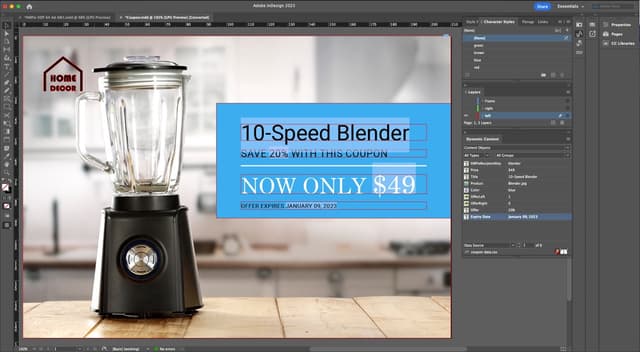
Create data-ready templates in Adobe InDesign and use our personalization plugin to activate variable content.
Upload & Connect
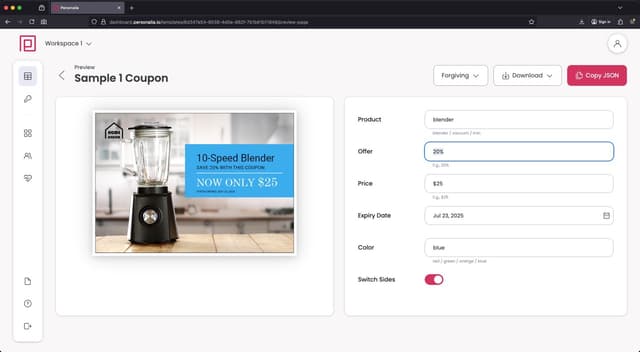
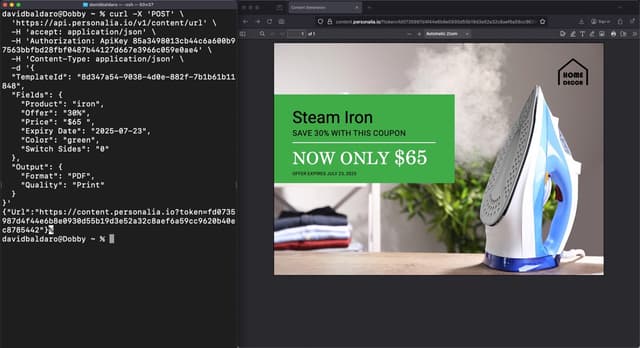
Package and upload your template to Personalia, then link it to your data workflows via API or built-in integrations.
Generate & Deliver
Send data to generate unique PDFs, PNGs, or JPGs—ready to download, and handle within your process or workflow.
Outgrown Your Current Tools?
If you've hit the ceiling with web-based design automation, you're not alone.
Web-Canvas Tools Fall Short
Web-based automation tools use a browser to "take a screenshot" of your design. The result? Fonts render differently, layouts shift, and advanced typography is impossible.
- No GREP styles or nested styles
- No optical kerning or complex ligatures
- No print-ready output (CMYK, bleeds, spot colours)
Server-Side InDesign Rendering
Personalia renders your InDesign templates server-side with full fidelity — not a web browser. If it looks right in InDesign, it looks right in the output. Every time.
- Full support for every InDesign typography feature
- Press-ready output with full colour management
- Trusted by enterprise teams worldwide
Adobe InDesign Integration
Design in Adobe InDesign, then package your templates for Personalia. Our platform supports the most commonly used InDesign features, letting you stay in the creative environment you're familiar with.
Design templates in InDesign and package them for use with Personalia
Control dynamic images, text, paragraph and object styles
Define visibility rules for layers and spreads
Implement business rules and logic within the template
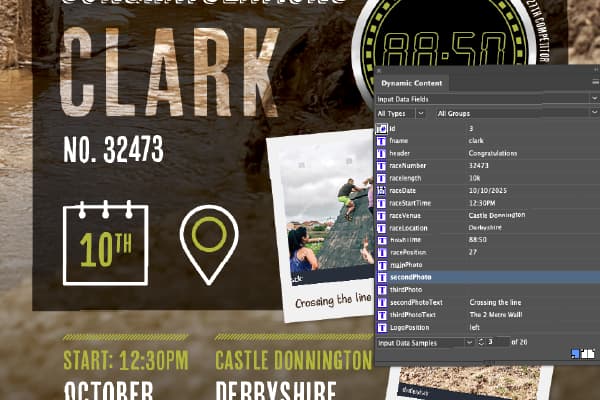
Creative Control, Powered by Data
When you design for Personalia, you're designing with XLIM - our rendering engine that turns your Adobe InDesign layouts into dynamic, personalised masterpieces. Your creative process stays exactly where you want it: inside InDesign, with your original file always remaining the source of truth.
Static Elements
100% FidelityAny part of your design that remains constant is rendered with full InDesign fidelity. Use the most complex features for backgrounds, brand assets, and fixed layouts.
Dynamic Elements
Data-DrivenWhen you link an object to data, XLIM simulates InDesign's rendering—supporting professional typography, styles, colours, and layout logic like auto-flow and copyfitting.
What You Can Make Dynamic
Dynamic Text & Typography
Insert variable text with full control over fonts, paragraph styles, and typographic settings. Each instance maintains professional quality.
Dynamic Images
Place images from asset libraries or live URLs. Images automatically scale and crop within frames as designed.
Data-Driven Styles
Apply paragraph and object styles automatically based on data, ensuring design consistency across every variation.
Conditional Layers & Spreads
Switch layers or entire spreads on or off based on data, creating targeted versions within a single template.
Dynamic Barcodes
Generate QR codes and barcodes directly from live data and place them anywhere in your design.
Multi-Page Automation
Produce personalised brochures, catalogues, or reports with data controlling content across every page.
Stay in the Green Zone: The Preflight Tool
The XLIM Preflight panel is your real-time assistant, providing live creative guidance and instant validation to ensure your design is optimised for the Personalia API before you even finish it.
Every piece generated by Personalia—whether PDF, PNG, or JPG—perfectly reflects your original creative intent with production-ready quality including CMYK colours, bleeds, and professional print settings.
"Implementing Personalia has been a game-changer for our design team. We can now create beautiful, on-brand materials at scale with consistent quality. Our production time has decreased by 70% while maintaining our high design standards."
Sarah Johnson
Creative Director
See It In Action
Experience Personalia's powerful features with our interactive demo.
Sample Marketing Coupon
One template setup to accommodate four different products, two different layouts, and infinite options.
Template ID:
7e15015c-cf37-42b5-b87e-ab3311b24673Preview
Your preview will appear here
Fill in the form and click "Generate Asset"
One Template, Multiple Outputs
Design once and deliver content optimized for both digital and print channels.
Digital Assets
Automatically generate RGB PDFs, JPGs, or PNGs with optimal file size for email and digital distribution.
Print-Ready Files
Generate high-resolution 300 DPI PDFs with bleeds, crops, and spot colours for professional printing.
Brand Consistency
Maintain perfect colour accuracy across all channels, from RGB for screens to CMYK and spot colours for print.
Time Savings
Reduce production time by eliminating the need to create separate designs for digital and print.
Ready to Transform Your Design Workflow?
Start creating templates that maintain your design integrity while saving time and resources.