
Turn InDesign Into a Fully Automated Document Platform.
Integrate a proven, stable rendering engine directly into your workflows, without fighting the unpredictable output of browser‑based PDF tools.
Build the Experience. Automate the Assets.
Let Personalia handle the content pipeline and infrastructure while you architect the experiences that matter most. No servers to manage — just scalable asset generation via API.

Simple API Integration
Connect to Personalia with our RESTful API. We handle the rendering infrastructure — you just make API calls and receive production-ready assets.

Easy Automation
Use our pre-built connectors for popular no-code automation tools to integrate Personalia without writing a single line of code.

Generate & Deliver
Generate content for digital and print from a single source. Scale from one request to hundreds of thousands — our infrastructure handles the load.
Integrate pro-grade InDesign rendering into your workflows in minutes
Personalia turns your InDesign templates into a scalable API-driven rendering service. No rendering servers to build or maintain — we handle the infrastructure. Simply upload your template, call our API, and scale from one request to hundreds of thousands. Whether you are building marketing portals, powering eCommerce, or automating print production, Personalia fits directly into your stack. Here is how it works:
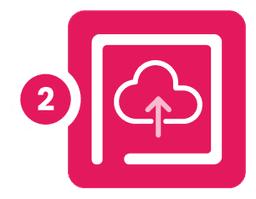
Design Templates
Create data-ready templates in Adobe InDesign and use our personalization plugin to activate variable content.
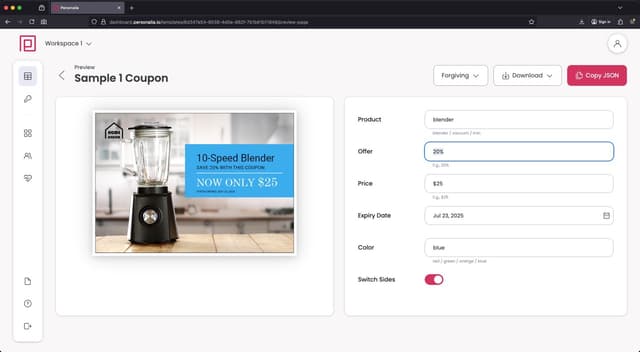
Upload & Connect
Package and upload your template to Personalia, then link it to your data workflows via API or built-in integrations.
Generate & Deliver
Send data to generate unique PDFs, PNGs, or JPGs—ready to download, and handle within your process or workflow.
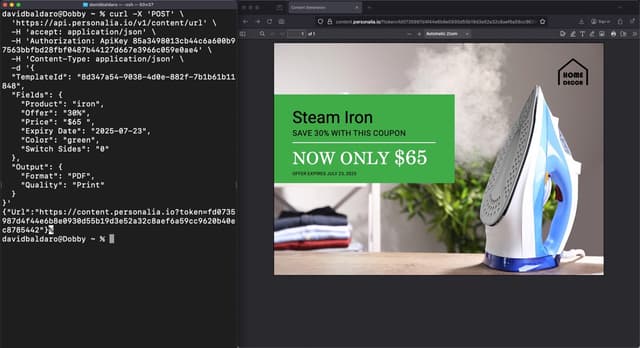
Escape HTML-to-PDF Hell
You've tried Puppeteer, wkhtmltopdf, and every HTML-to-PDF library. Time for a better approach.
Why CSS Wasn't Built for Documents
HTML and CSS were designed for web pages, not multi-page documents. The result? Endless workarounds and compromises.
- Page breaks — CSS rules are inconsistent across browsers
- Headers/footers — require complex JavaScript workarounds
- Typography — limited to web fonts, no advanced controls
- Print output — CMYK, bleeds, and spot colours are nearly impossible
Let Designers Handle Design
InDesign was built for documents. Page breaks, headers, footers, and typography work as expected. Your designers create templates; you make API calls.
- Clean separation — design in InDesign, data via API
- Predictable output — no browser rendering quirks
- Professional quality — print-ready or screen-optimised
- Less code — no CSS hacks or browser workarounds
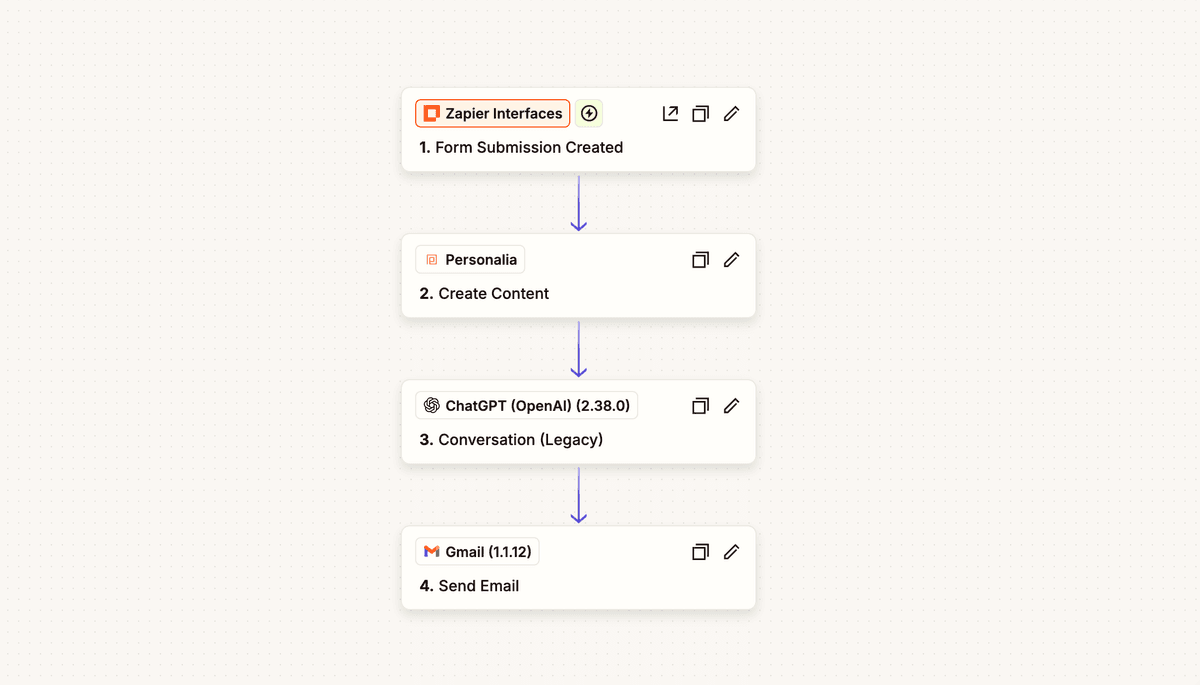
Flexible Integration Options
Connect Personalia to your existing systems and workflows with our flexible integration options.
RESTful API for direct integration with your applications
Pre-built connectors for popular no-code automation tools
Webhook support for event-driven workflows
Support for multiple output formats (PDF, JPG, PNG)
Creative Control, Powered by Data
When you design for Personalia, you're designing with XLIM - our rendering engine that turns your Adobe InDesign layouts into dynamic, personalised masterpieces. Your creative process stays exactly where you want it: inside InDesign, with your original file always remaining the source of truth.
Static Elements
100% FidelityAny part of your design that remains constant is rendered with full InDesign fidelity. Use the most complex features for backgrounds, brand assets, and fixed layouts.
Dynamic Elements
Data-DrivenWhen you link an object to data, XLIM simulates InDesign's rendering—supporting professional typography, styles, colours, and layout logic like auto-flow and copyfitting.
What You Can Make Dynamic
Dynamic Text & Typography
Insert variable text with full control over fonts, paragraph styles, and typographic settings. Each instance maintains professional quality.
Dynamic Images
Place images from asset libraries or live URLs. Images automatically scale and crop within frames as designed.
Data-Driven Styles
Apply paragraph and object styles automatically based on data, ensuring design consistency across every variation.
Conditional Layers & Spreads
Switch layers or entire spreads on or off based on data, creating targeted versions within a single template.
Dynamic Barcodes
Generate QR codes and barcodes directly from live data and place them anywhere in your design.
Multi-Page Automation
Produce personalised brochures, catalogues, or reports with data controlling content across every page.
Stay in the Green Zone: The Preflight Tool
The XLIM Preflight panel is your real-time assistant, providing live creative guidance and instant validation to ensure your design is optimised for the Personalia API before you even finish it.
Every piece generated by Personalia—whether PDF, PNG, or JPG—perfectly reflects your original creative intent with production-ready quality including CMYK colours, bleeds, and professional print settings.
Build Powerful Workflows
Integrate Personalia into your business processes to automate asset generation at any scale.
CRM Integration
Trigger personalised collateral generation when prospects move through your pipeline. Connect to Salesforce, HubSpot, or any CRM via API or Zapier.
E-commerce
Generate product brochures, spec sheets, and personalised offers on-demand based on customer data, cart contents, or browsing history.
Email Campaigns
Create unique, personalised attachments or embedded images for each recipient in your email campaigns at scale.
Report Generation
Automate the creation of branded reports, statements, and documents by pulling data from your databases or analytics platforms.
Real Estate & Property
Generate property brochures, flyers, and listing sheets automatically from your property management system or MLS data.
Publishing & Catalogues
Automate catalogue and publication production by connecting to your PIM or product database for always up-to-date content.
Simplify Digital & Print Workflows
One template, countless versions, multiple delivery formats – powerered by one powerful production service.
Unified Asset Management
Personalia unifies digital and print asset production, so you can manage all assets from one place.
Simple API Endpoints: Generate both digital and print-ready assets, or content-urls, with simple API calls
Output Configuration: Specify output intent for digital or print across multiple file formats (PDF, JPG, PNG) with simple parameters in your API calls
Optimized Pipeline: Easily handle desired resolution, and technical specifications for each medium
Reduced Development: Build once, deliver everywhere — no need for separate systems for digital vs. print content
// Generate digital version (low-res, RGB, for email)
const digitalResponse = await personalia.render({
  "TemplateId": "3e18cd92-39cd-400d-ab40-18284d7fd8f9",
  "Fields": {
    "Image": "Image",
    "Logo Type": "Logo Type",
    "From Name": "From Name",
    "Message": "Message",
    "To Name": "To Name"
  },
  "Output": {
    "Format": "PNG",
    "Resolution": 72
  }
});

// Generate print version (high-res, CMYK+spot, with bleeds)
const printResponse = await personalia.render({
  "TemplateId": "3e18cd92-39cd-400d-ab40-18284d7fd8f9",
  "Fields": {
     "Image": "Image",
    "Logo Type": "Logo Type",
    "From Name": "From Name",
    "Message": "Message",
    "To Name": "To Name"
  },
  "Output": {
    "Format": "PDF",
    "Quality": "Print"
  }
});
Connect With Your Tools
Personalia integrates seamlessly with your favorite platforms and automation tools.

Zapier
Connect Personalia to 5,000+ apps without coding

Make
Create complex automations with visual workflows

n8n
Open-source workflow automation with self-hosting options

WordPress
Integrate with WordPress and Elementor for dynamic websites

Enfocus Switch
Integrate with Enfocus Switch for dynamic content
1. Request PDF Generation
Start by sending a POST request to generate a PDF document with your template and data.
// 1. Request PDF generation
const response = await fetch(
  'https://api.personalia.io/v1/content',
  {
    method: 'POST',
    headers: {
      'Content-Type': 'application/json',
      'Authorization': 'ApiKey YOUR_API_KEY'
    },
    body: JSON.stringify({
      TemplateId: 'c790fd3b-10ef-4a58-963b-b688e564eefa',
      Fields: {
        'First Name': 'John',
        'Machine': 'AK-2000',
        'Color': 'Blue'
      },
      Output: {
        Format: 'PDF',
        Quality: 'Display',
        Package: false,
        StrictPolicy: true
      }
    })
  }
);

// 2. Get the request ID for polling
const { RequestId } = await response.json();
2. Poll for Completion
Poll the API to check if your PDF is ready for download. Once it is ready the URL to the asset remains live for 30 minutes.
// 3. Poll for completion
const getResult = async () => {
  const result = await fetch(
    `https://api.personalia.io/v1/content?requestId=${RequestId}`,
    {
      headers: {
        'Authorization': 'ApiKey YOUR_API_KEY'
      }
    }
  );
  return await result.json();
};

// 4. Check status periodically
let result = await getResult();
while (result.Status === 'InProgress') {
  await new Promise(resolve => setTimeout(resolve, 1000));
  result = await getResult();
}

// 5. Handle the result
if (result.Status === 'Completed') {
  console.log('Download URL:', result.URLs[0]);
  // URL is valid for 15 minutes
} else if (result.Status === 'Failed') {
  console.error('Generation failed:', result.FailureDescription);
}
API Endpoint Comparison
Personalia offers two different approaches to content generation through our API, each suited for different use cases.
Immediate Rendering
Endpoints: POST /v1/content + GET /v1/content
The POST request triggers immediate rendering of your asset, and you poll the GET endpoint until the asset is ready for download. Once complete, the download URL remains valid for 30 minutes.
Best for:
- Immediate content needs
- Batch processing
- Server-side applications
- When you need the asset right away
This method is best when you need the asset immediately. Credits are charged immediately
On-Demand Rendering
Endpoint: POST /v1/content/url
This endpoint immediately returns a URL that stays valid for 30 days. The asset is only rendered and delivered when someone accesses the URL, and the final document is returned directly to the user.
Best for:
- Email campaigns with document links
- Cost optimization (only pay when rendered)
- User-triggered document generation
- When immediate rendering isn't needed
This method is best for when you want to generate content on demand and only pay for credits when the asset is rendered.
"Integrating Personalia into our workflow has been a game-changer for our development team. We can now generate beautiful, on-brand materials at scale through a simple API. Our production time has decreased by 70% while maintaining high design standards."
Sarah Johnson
Creative Director, ABC Agency
Ready to Build Something Creative and Amazing?
Let Personalia help you to create something that will make your clients truly happy and your team more productive. Get in contact with us and let our dedicated team can help you with your next project.